aozora — a Rust parser for Aozora Bunko notation

aozora is a Rust parser for Aozora Bunko notation (青空文庫記法), the in-text annotation language used in .txt files distributed by Aozora Bunko. It does not handle CommonMark or any Markdown dialect — only the Aozora Bunko notation itself. The implementation ships as five distribution surfaces: a CLI binary, a Rust library, a WASM module, a C ABI driver, and Python bindings via PyO3 / maturin.
use aozora::Document;

let source = "|青梅《おうめ》".to_owned();
let doc = Document::new(source);
let tree = doc.parse();

let html: String = tree.to_html();
let canonical: String = tree.serialize();
let diagnostics = tree.diagnostics();

assert_eq!(canonical, "|青梅《おうめ》");
- Handbook: https://p4suta.github.io/aozora/
- Repository: https://github.com/P4suta/aozora
- Current release: v0.3.0, Rust 1.95 minimum, dual-licensed Apache-2.0 OR MIT
What Aozora Bunko is
Aozora Bunko (literally "Open-Sky Library") is a volunteer-run digital library of Japanese-language literature in the public domain. It has been operating since 1997 and currently distributes more than 18,000 works — Sōseki, Akutagawa, Dazai, and several thousand other authors whose copyrights have expired under Japanese law. Volunteers transcribe printed editions into plain text, proofread them, and post the results for free download.
It is not a government agency or a commercial publisher. There is no curation editorial committee. The closest English-speaking analogue is Project Gutenberg, with one important difference: Aozora Bunko texts use a domain-specific in-line annotation syntax to encode features that plain text cannot natively represent — ruby (furigana), emphasis dots, vertical/horizontal text orientation, and references to non-Unicode Japanese characters. Without that annotation language, a great deal of typographic information from the print edition would be lost.
What the notation looks like
A few examples of the notation Aozora Bunko texts contain, all of which aozora parses:
- Ruby:
|青梅《おうめ》— phonetic gloss attached to a base text run (the kanji 青梅, which is a place name, gets the reading "おうめ") - Bouten (emphasis dots):
[#「ここに傍点」に傍点]— the Japanese equivalent of italics, rendered as dots above each character in vertical text - Tate-chu-yoko:
[#「23」は縦中横]— short horizontal runs inside vertical text (used for two-digit numbers) - Gaiji (out-of-character-set references):
※[#「魚+師」、第3水準1-94-37]— references to characters outside basic Japanese encodings, often via JIS X 0213 plane-row-cell coordinates - Kunten / kaeriten: classical Chinese reading marks
- Indent containers:
[#ここから2字下げ]… [#ここで字下げ終わり]— block-scoped indentation - Page and section breaks: chapter delimiters
aozora recognises every annotation that appears in a real Aozora Bunko .txt source and converts it into a structured AST plus a stream of diagnostics for malformed input.
Installation and use
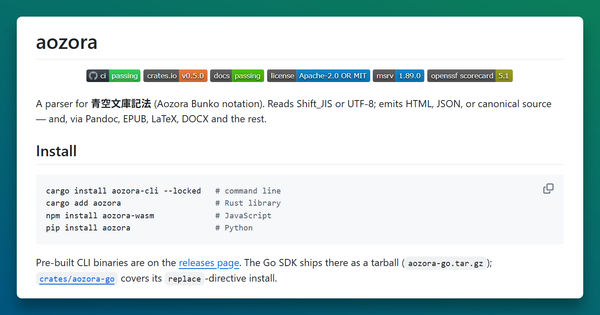
Pre-built CLI binaries for Linux x86_64, macOS arm64, and Windows x86_64 are attached to every GitHub Release as aozora-vX.Y.Z-<target>.{tar.gz,zip} archives, with SHA256SUMS alongside.
To build from source:
cargo install --git https://github.com/P4suta/aozora --locked aozora-cli
CLI subcommands cover the common tasks:
aozora check FILE.txt           # lex and report diagnostics
aozora fmt --check FILE.txt     # parse-then-serialize round-trip check
aozora render FILE.txt          # render to HTML on stdout
aozora check -E sjis FILE.txt   # read Shift_JIS, the Aozora Bunko native encoding
All subcommands accept - (or no path) to read from stdin.
The Rust library entry point is the snippet at the top of this article. Document owns a bumpalo arena; tree borrows from it for the lifetime of the Document. WASM, C ABI, and Python bindings have their own minimal examples in the handbook's Bindings chapters.
What is distinctive about the implementation
Three design decisions are worth highlighting. Each has its own dedicated chapter in the handbook's Architecture section.
Markdown is out of scope. Aozora Bunko notation is not CommonMark, GFM, or any other Markdown dialect — it is a separate annotation system designed for transcribing print Japanese literature. aozora confines itself to that notation. If you want to write Markdown text that also contains Aozora Bunko annotations, the sibling project afm is a Markdown dialect built on top of aozora.
SIMD multi-pattern scanner. Aozora Bunko text is mostly UTF-8 Japanese (3 bytes per codepoint), with the seven trigger bytes (|《》※[] and full-width space) appearing roughly once per kilobyte of source. Scanning that sparse pattern set efficiently is the dominant cost in lexing, so aozora uses Intel Hyperscan's Teddy algorithm via aho-corasick. On x86_64 with AVX2 it runs at ~12 GB/s on the corpus benchmark. On targets without AVX2 it falls back via runtime dispatch to a Hoehrmann-style multi-pattern DFA (~3.5 GB/s). The wasm32 target uses memchr's portable multi-pattern path (~1.2 GB/s) until the WebAssembly SIMD proposal stabilises.
Borrowed-arena AST. A typical Aozora Bunko work parses to roughly 50,000 AST nodes. Allocating each one as an individual Box<Node> makes the allocator the bottleneck. aozora uses a single bumpalo::Bump arena per Document; the parser writes nodes into it in lex order and the tree borrows from the arena for its entire lifetime. On a corpus sweep over the full Aozora Bunko archive the arena variant is 6.4× faster than the equivalent Box<Node> shape, with peak RSS reduced by 30%. Drop is one Bump::reset call regardless of node count.
Where to go next
- Handbook: https://p4suta.github.io/aozora/ — notation reference, architecture (borrowed-arena AST, SIMD scanner backends, Shift_JIS + gaiji resolver, Eytzinger-layout sorted-set lookup), performance (PGO pipeline, samply workflow, corpus sweep), and bindings.
- API reference: https://p4suta.github.io/aozora/api/aozora/ — auto-deployed rustdoc.
- Related projects:
P4suta/afm— CommonMark + GFM + Aozora Bunko notation, a unified Markdown dialect built on top ofaozora.P4suta/aozora-tools— authoring tools: formatter, LSP server, tree-sitter grammar, VS Code extension.
Publication to crates.io is gated on the v1.0 API freeze. Until then, depend on a tagged commit (the install chapter of the handbook keeps the current Cargo.toml snippet).